Key Components of Industrial Panel PC
Main Hardware Parts
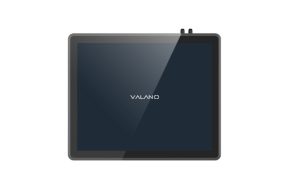
Industrial panel pc systems rely on several key hardware components. The central processing unit (CPU) manages all tasks and controls operations. Memory modules store temporary data and support fast access during processing.
Motherboards connect all parts and allow communication between devices. Input and output ports provide access for peripherals and external connections. Cooling fans and heat sinks protect hardware from overheating and ensure stable performance.
| Hardware Component | Function | Maintenance Tip |
|---|---|---|
| CPU | Controls operations | Check for dust buildup |
| Memory | Stores temporary data | Inspect for corrosion |
| Motherboard | Connects all devices | Look for loose cables |
| Ports | External connections | Clean with compressed air |
| Cooling System | Manages heat | Remove dust regularly |
Checking hardware health is important for early detection of issues. Use diagnostic tools to monitor performance and spot potential problems.
Storage Device Health
Storage devices hold critical data and software for industrial applications. Hard drives and solid-state drives (SSD) must remain in good condition to avoid data loss. Inspect storage devices for signs of wear or unusual noises.
Monitor storage capacity and performance using built-in system tools. Replace aging drives before failure occurs. Keep storage areas clean and free from dust to prevent overheating.
A healthy storage device supports reliable operation and reduces downtime. Maintenance routines should include checking hardware health and reviewing storage status. Early action prevents costly repairs and keeps industrial systems running smoothly.
Common Maintenance Issues
Overheating Risks
Overheating is a common problem in many panel PCs. High temperatures can damage sensitive components and cause system failures. Dust buildup in cooling fans and vents blocks airflow and increases the risk of overheating.
Some panel PCs operate in environments with high ambient temperatures. These conditions make overheating more likely. Monitoring internal temperature levels is important for early detection of problems.
A table can help track temperature readings:
| Component | Normal Temp (°F) | Warning Temp (°F) |
|---|---|---|
| CPU | 95-120 | 130+ |
| Storage Drive | 85-110 | 120+ |
| Motherboard | 90-115 | 125+ |
If temperatures rise above warning levels, shut down the system and inspect cooling parts. Quick action prevents permanent damage.
Environmental Challenges
Industrial panel PCs often face harsh environmental conditions. Dust, moisture, and vibration can affect performance and reliability. Regular maintenance protects equipment from these hazards.
Moisture can cause corrosion and short circuits. Keep panel PCs away from water sources and check for leaks. Vibration may loosen cables or connectors, so inspect connections during routine checks.
A checklist helps manage environmental risks:
- Check for dust buildup weekly.
- Inspect for moisture or leaks monthly.
- Test cable connections every quarter.
Addressing these challenges improves system reliability and extends equipment lifespan.
Cleaning and Inspection for Equipment Running Smoothly
Safe Cleaning Methods
Regular cleaning procedures help keep equipment running smoothly. Use antistatic solutions and low-lint towels to remove dust from screens and surfaces. These materials prevent static buildup and protect sensitive industrial components.
Compressed air is effective for cleaning ports and vents. Hold the can upright and spray short bursts to clear dust accumulation. Avoid using water or harsh chemicals, as these can damage the equipment.
Air purifiers reduce dust in the environment. Place them near panel PCs to minimize dust accumulation and improve performance. Clean workspaces often to prevent dust from settling on equipment.
Inspection Checklist
Inspections are essential for maintaining reliable operation. Create a checklist to guide regular inspections and ensure thorough coverage. Focus on areas where dust and debris collect most often.
| Inspection Task | Frequency | Purpose |
|---|---|---|
| Check for dust buildup | Weekly | Prevent overheating |
| Inspect ports and vents | Weekly | Ensure proper airflow |
| Examine cables | Monthly | Detect loose connections |
| Review cooling fans | Monthly | Identify dust accumulation |
| Assess storage devices | Quarterly | Monitor hardware health |
Inspections should include visual checks and gentle cleaning. Look for signs of dust accumulation, corrosion, or wear. Document findings after each inspection to track maintenance history.
Inspections improve reliability and extend the lifespan of industrial panel PCs. Combine cleaning procedures with regular inspections for best results.
Temperature and Ventilation Management
Monitoring System Temperature
Temperature control is vital for industrial panel PCs. High temperatures can cause hardware to fail and reduce performance. Regular inspections help detect temperature problems early.
Use built-in monitoring tools to check system temperature. Record readings during each inspection. Compare these numbers to normal operating ranges.
Even IP-rated devices need clean ventilation paths. Dust can block vents and raise internal temperatures. Schedule inspections to remove dust from all air passages.
A simple table helps track temperature checks:
| Component | Last Checked | Status |
|---|---|---|
| CPU | ||
| Storage Drive | ||
| Motherboard |
Keep this table updated after every inspection.
Ventilation and Heat Dissipation
Proper ventilation ensures that heat leaves the system quickly. Good airflow supports stable operation and extends equipment life. Place panel PCs in open areas with plenty of space around vents.
Dust often collects in vents and on fans. Remove dust during each inspection to keep air moving freely. Clean fans and grills with compressed air for best results.
Heat dissipation design matters in industrial settings. Use systems with metal cases or built-in heat sinks. These features help move heat away from sensitive parts.
Check that all cooling fans work during inspections. Replace faulty fans right away. Add extra fans or heat sinks if the system runs hot.
Heat dissipation improves when nothing blocks airflow. Do not stack items near the panel PC. Keep cables organized and away from vents.
Regular maintenance, inspections, and cleaning protect against overheating. These steps support reliable performance and longer equipment life.
Software and Firmware Maintenance
Regular Updates
Software and firmware updates play a key role in industrial pc maintenance. Updates fix bugs, patch security holes, and improve system performance. Keeping software current helps prevent unexpected errors and downtime.
Many industrial systems run for long periods without updates. This can lead to outdated features and increased risk of cyber threats. Set a schedule to check for updates from trusted sources.
A simple update checklist can help:
- Review available software updates monthly.
- Check firmware versions every quarter.
- Record update dates in a logbook.
Safe Update Practices
Safe update practices protect your industrial equipment from problems during maintenance. Always back up important data before starting any update. This step prevents data loss if something goes wrong.
Download updates only from official or trusted websites. Avoid using files from unknown sources, as they may contain malware. Test updates on a non-critical system first when possible.
A table can help track update safety steps:
| Step | Purpose |
|---|---|
| Backup data | Prevent data loss |
| Verify source | Avoid malware |
| Test on spare unit | Check for compatibility |
Following these steps ensures safe and reliable updates. Good update habits support long-term industrial system performance and reduce risks.
Diagnostics and System Health
Running Diagnostics
Diagnostics help identify problems before they cause downtime. Conducting system diagnostics checks the health of hardware and software. Many industrial panel PCs include built-in tools for this purpose.
Technicians run diagnostics to test memory, storage, and processor performance. These tests reveal issues like overheating or failing components. Early detection allows for quick maintenance and prevents costly repairs.
A simple checklist for diagnostics:
- Test memory modules for errors.
- Check storage devices for bad sectors.
- Review CPU performance and temperature.
- Inspect cooling fans and ventilation.
Document results after each test. This record helps track changes and spot trends over time.
Monitoring Tools
Monitoring tools provide real-time information about system health. These tools display temperature, voltage, and fan speed. Users can set alerts for abnormal readings.
Many industrial environments use software to monitor multiple panel PCs at once. This approach improves efficiency and reduces manual checks. Some tools offer dashboards with graphs and status indicators.
| Monitoring Feature | Benefit |
|---|---|
| Temperature Alerts | Prevent overheating |
| Voltage Monitoring | Detect power issues |
| Fan Speed Display | Ensure proper cooling |
| Storage Health | Avoid data loss |
Monitoring tools help maintain stable operation. They also support quick response when problems arise. Reliable diagnostics and monitoring protect your investment and extend equipment lifespan.
Security for Industrial Panel PC
Malware Protection
Industrial panel PCs face many security threats. Malware can enter through USB drives, network connections, or even software updates. It can slow down the system or steal important data.
Install trusted antivirus software on every device. Update virus definitions often to catch new threats. Run full system scans at least once a month.
Train staff to recognize suspicious emails and files. Never open unknown attachments or click on strange links. These simple steps help keep malware out of your system.
A quick checklist for malware protection:
- Install and update antivirus software.
- Scan devices regularly.
- Limit access to critical systems.
- Educate users about safe practices.
Security Protocol Updates
Security protocols protect data and control who can access the system. Outdated protocols make it easier for hackers to break in. Regular updates keep your system safe from new threats.
Check for security updates from your device manufacturer. Apply patches as soon as they become available. Record each update in your maintenance log.
| Security Task | Frequency | Why It Matters |
|---|---|---|
| Check for updates | Monthly | Fixes known weaknesses |
| Apply patches | Promptly | Blocks new threats |
| Review user permissions | Quarterly | Prevents unauthorized access |
Security is a key part of industrial system maintenance. Good habits and regular updates help prevent costly problems and keep your equipment running safely.
Power Supply and Backup
Checking Power Sources
Reliable power is essential for keeping equipment running in any industrial setting. Unstable power can cause sudden shutdowns or damage sensitive parts. Regular checks of power sources help prevent unexpected failures.
Start by inspecting all power cables and connectors. Look for signs of wear, fraying, or loose connections. Replace damaged cables right away to avoid risks.
A simple checklist can help keep track of power source inspections:
| Inspection Task | Frequency | Purpose |
|---|---|---|
| Check cables | Monthly | Prevent power loss |
| Test power outlets | Quarterly | Ensure stable voltage |
| Inspect connectors | Monthly | Avoid loose connections |
Backup power systems, such as uninterruptible power supplies (UPS), add another layer of protection. These systems keep equipment running during short outages. Test backup systems regularly to make sure they work when needed.
Surge Protection
Power surges can damage equipment quickly. Lightning strikes, power grid changes, or large machines starting up can cause sudden spikes in voltage. Surge protectors help block these spikes and keep equipment safe.
Install surge protection devices on all main power lines connected to equipment. Choose surge protectors rated for industrial use. Replace surge protectors after any major surge event, as their ability to protect may decrease over time.
A few simple steps can improve surge protection:
- Use surge protectors with indicator lights to show active protection.
- Keep backup surge protectors on hand for quick replacement.
- Review surge protection devices during regular maintenance checks.
Proper power supply management and surge protection help extend the lifespan of equipment. These steps support reliable operation and reduce downtime in industrial environments.
Maintenance Scheduling
Routine Checklist
A routine checklist supports effective industrial pc maintenance. It helps teams remember important tasks and ensures nothing gets missed. Scheduled inspections form the backbone of this process.
Start by listing all areas that need attention. Include cleaning, temperature checks, and software updates. Scheduled inspections should cover hardware, storage, and ventilation.
A sample checklist for regular maintenance might look like this:
| Task | Frequency | Responsible |
|---|---|---|
| Clean vents and fans | Weekly | Technician |
| Inspect cables and ports | Monthly | Technician |
| Run diagnostics | Monthly | IT Staff |
| Review software updates | Monthly | IT Staff |
| Check surge protection | Quarterly | Electrician |
Scheduled inspections keep equipment in top shape. They also help prevent small issues from becoming big problems. Preventive maintenance relies on following these routines.
Record-Keeping
Good record-keeping is essential for industrial pc maintenance. It tracks when scheduled inspections happen and what results they show. This information helps teams spot patterns and improve performance.
Use a logbook or digital system to record each inspection. Write down the date, tasks completed, and any issues found. Regular maintenance schedules become easier to manage with clear records.
Scheduled inspections and routine record-keeping work together. They support preventive maintenance and help extend the lifespan of industrial equipment. Consistent documentation ensures that inspections are never missed and that performance stays reliable.
Conclusion
Regular care for an industrial panel pc is essential for long-term reliability. A structured maintenance plan keeps equipment running smoothly and helps prevent downtime. When you follow these best practices, you increase reliability, reduce downtime, and keep your industrial panel pc working at its best.